5 Ways to Get More Done with Motorq Fuse Assistant
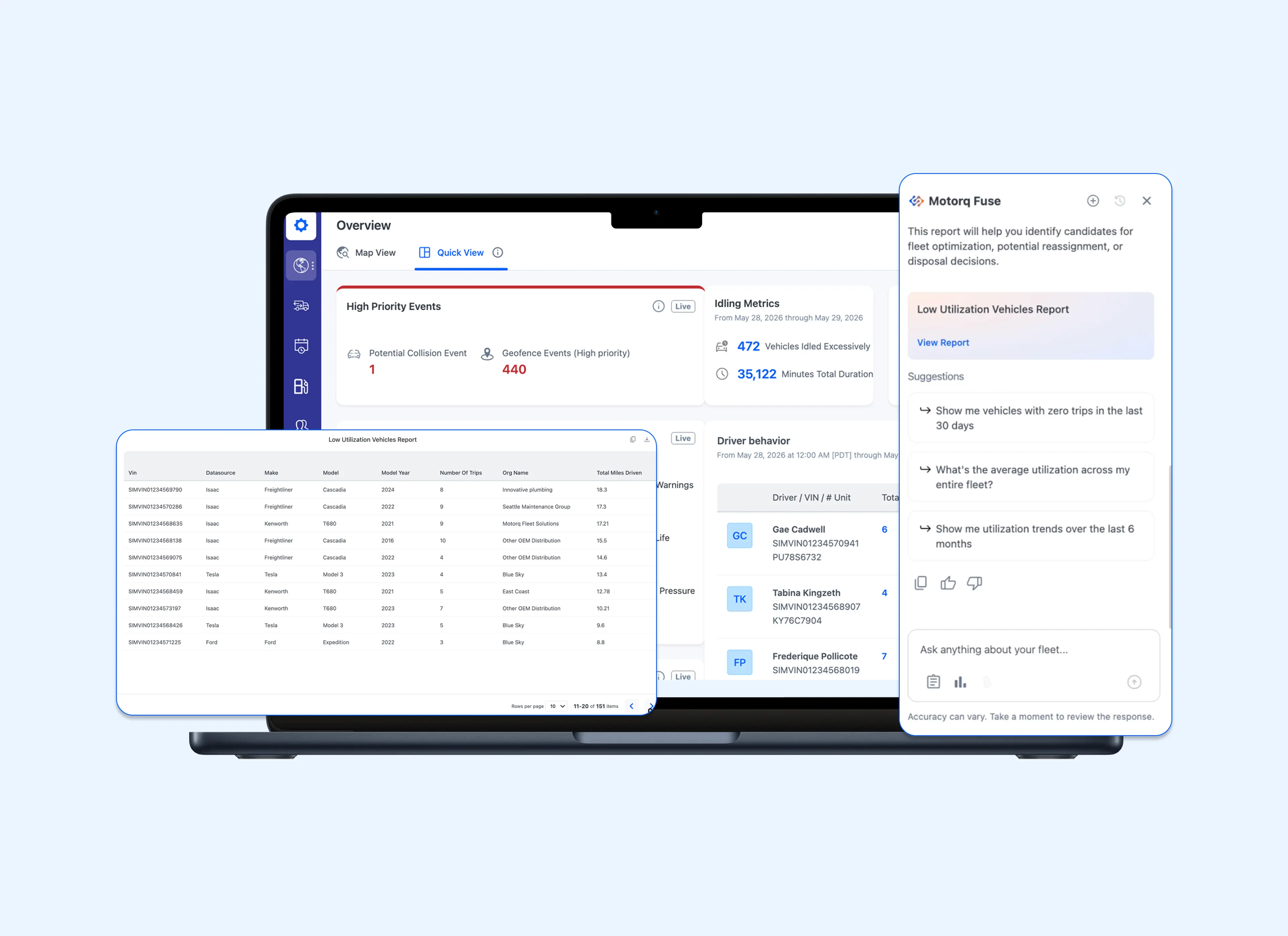
If you manage vehicle portfolios for a living, you’re used to having questions that are difficult to answer.
Not because the data isn’t available — most already have plenty of vehicle data. It’s that knowing which report to pull or which filter to apply isn’t always obvious. Getting to the answer has meant knowing your way around multiple systems, and not everyone has the time to become an expert in all of them.
That’s been the nature of working with vehicle data. The information exists, but it's never been as simple as just asking for it.
Fuse Assistant changes that. With Fuse, you can type a question in plain language, the same way you'd ask a colleague who knows the data inside out, and you get an answer right away.
In this post, we’ll walk through some of the most common ways teams are using Fuse Assistant, along with some prompts worth trying.
1. Daily Mileage & Utilization
Mileage and trip reporting is one of the most common uses of Fuse Assistant because it helps teams quickly understand how vehicles are being utilized across their operations.
Customers use these insights to identify underutilized assets, compare activity across regions or accounts, and better understand how vehicles are being used over time.
A common starting point is a simple question:
“Show me vehicles that have driven less than 50 miles in the last 30 days. I want to identify underutilized assets.”
Fuse Assistant immediately identifies the relevant vehicles and provides the mileage information needed to evaluate utilization across the fleet.
From there, teams often continue with prompts such as:
- Which regions have the most underutilized vehicles?
- Which vehicles have been idle for more than two weeks?
- Which assets have the lowest utilization this quarter?
- How does utilization compare to last month?
- Are there vehicles that could be reassigned to other locations?
Because Fuse Assistant maintains context across the conversation, teams can continue exploring the data without rebuilding reports or starting over each time. A simple utilization question can quickly turn into a deeper investigation that helps identify opportunities, trends, or operational issues.
2. Identifying Excessive Vehicle Idling
While utilization data helps teams understand how vehicles are being used, idling data helps uncover where operational inefficiencies may be increasing fuel consumption and vehicle wear.
Fleet managers may know excessive idling is occurring, but identifying the vehicles responsible can be difficult across a large fleet.
For example, a fleet manager might ask:
“Show me the highest idling hour vehicles for May"
Fuse Assistant returns a ranked list of vehicles with the highest recorded idling hours, making it easy to identify where corrective action may be needed.
These insights can help organizations reduce fuel waste, improve operational efficiency, and prioritize coaching or maintenance efforts for vehicles showing unusual behavior.
Once the initial results are returned, teams can continue investigating with questions such as:
- Which vehicles have increased idling compared to last month?
- What is the estimated fuel cost associated with this idling activity?
- Are certain locations or regions contributing to higher idle times?
- Which vehicles consistently rank among the highest idling assets?
Rather than treating idling analysis as a standalone reporting exercise, teams can use Fuse Assistant to move from identification to investigation in a single conversation, helping them understand not just where idling is occurring, but why.
3. Reducing Vehicle Downtime
Vehicle downtime is rarely caused by a single issue. More often, it is the result of a combination of health alerts, fault conditions, and maintenance concerns that can be difficult to prioritize across a large fleet.
A common starting point is:
“Which vehicles are most likely to cause downtime?”
Fuse Assistant returns a prioritized list of vehicles along with the health issues and conditions contributing to potential downtime risk. This gives teams a clear starting point for investigation and helps focus attention on the assets most likely to impact operations.
The initial results often lead to additional questions such as:
- Which vehicles require immediate attention?
- What health issues are contributing most to downtime risk?
- Which vehicles have recurring fault conditions?
- Are there common issues affecting multiple vehicles?
- Which regions or groups have the highest concentration of at-risk vehicles?
- What maintenance actions would have the biggest impact on reducing downtime?
Rather than treating downtime analysis as a standalone reporting exercise, teams can use Fuse Assistant to move from identifying at-risk vehicles to investigating the health issues and fault conditions contributing to downtime in a single conversation, helping them understand not just which vehicles require attention, but why they are at risk.
4. Identifying Speeding Risks Across the Fleet
Speeding events can be difficult to evaluate at scale, especially when teams need to understand not only which vehicles are involved, but how frequent and severe the behavior is across the fleet.
A common starting point is:
“Which vehicles have the most speeding events this month, and how severe are they?”
Fuse Assistant returns a report highlighting the vehicles with the highest levels of speeding activity, along with key context such as event counts, duration, and maximum speed. This helps teams quickly identify where risk may be concentrated and which vehicles may require further review.
The initial results often lead to additional questions such as:
- Which drivers or vehicles repeatedly exceed speed limits?
- Where are speeding events occurring most often?
- How has speeding activity changed compared to last month?
- Which vehicles should be prioritized for coaching or review?
Rather than manually reviewing speeding reports, teams can use Fuse Assistant to move from identifying speeding events to investigating trends and prioritizing follow-up actions in a single conversation, helping them quickly focus on the vehicles and drivers that present the greatest risk.
5. Managing EV Fleet Readiness
Keeping electric vehicles charged and ready for service can be challenging, especially as fleets grow. Rather than manually checking battery levels across every vehicle, fleet teams need a fast way to identify which EVs require attention before they become unavailable.
A common starting point is:
“Which vehicles need charging today?”
Fuse Assistant analyzes battery levels and charging activity across the fleet to identify EVs that may be at risk of becoming unavailable. Results are prioritized by severity and include battery percentage, the latest battery readings, and current charging status, helping teams quickly determine where action is needed.
The initial results often lead to additional questions such as:
- Which EVs are not charging despite having a low battery?
- Which vehicles should be prioritized for charging first?
- Which ICE vehicles would be good candidates to switch to EVs?
Rather than manually monitoring battery levels across the fleet, teams can use Fuse Assistant to move from identifying vehicles that need charging to understanding charging status, trends, and potential risks in a single conversation, helping keep EVs charged, available, and ready for service.
Put Fuse Assistant to Work
For many teams, Fuse Assistant changes how they work entirely. Instead of navigating through reports and dashboards trying to figure out where the answer lives, they just ask. A single conversation can cover what previously took multiple steps across multiple systems.
The best way to get a feel for it is to start with something real. Think about the last time you had a question about your fleet and didn't bother looking it up because you knew it would take too long. Which vehicles have been sitting idle this month? Which assets are most likely to cause problems this week?
Start there. You might be surprised how quickly you get an answer...
Ready to stop hunting through dashboards and start managing your fleet at the speed of conversation? to see Fuse in action.